Enable WebSocket in OBS
The watcher listens to OBS to detect when you stop recording. If OBS doesn't have WebSocket enabled, recordings won't upload automatically (only if you set up a watched folder).
1Open OBS Studio
Make sure you have version 28 or higher. Earlier versions don't include built-in WebSocket — update from obsproject.com.
2Menu Tools → WebSocket Server Settings
In the OBS top bar: Tools → WebSocket Server Settings. A dialog opens with the options.
3Check "Enable WebSocket server"
At the top of the dialog, tick the Enable WebSocket server checkbox. That's the only required step. Leave everything else (port, password, alerts) at its default value unless you know what you're doing.
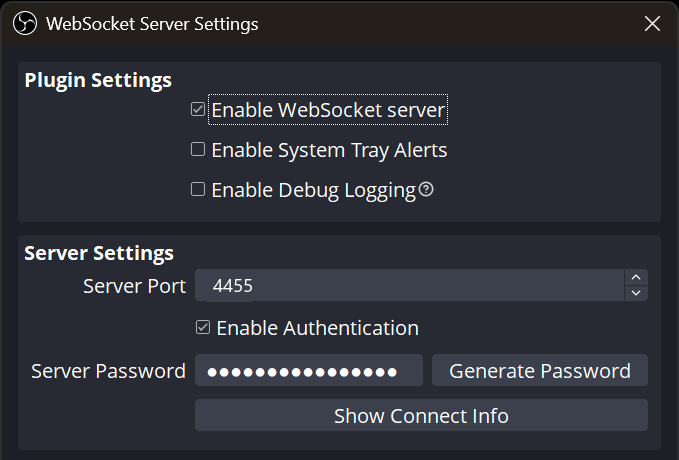
4Click Apply and OK
Apply the changes. The WebSocket server starts instantly.
What to change if you want a password?
By default OBS sets a random password (the dots in the field). If you want to use your own:
- Tick
Enable Authentication - Click
Generate Passwordor type your own - Copy the password and paste it into the watcher → right-click tray → ⚙ Settings → Settings → "OBS port and password"
Common issues
I still see "Waiting for OBS…" — check:
- OBS is open (not minimized to tray)
- The WebSocket port (default
4455) isn't taken by another app - The watcher starts on the correct port (Settings → Advanced → OBS port)
- If your antivirus or firewall blocks local connections (rare), add ManageEditors.exe to the allowlist
.mp4 / .mkv is uploaded automatically even if OBS is closed. WebSocket is only for detecting the start/end of a live recording.